
Introduction
You can deploy all the latest tools—AI assistants, cloud apps, VoIP phones, and remote work platforms—but if your internet is unreliable, your team will feel stuck in 2015. Modern small-business tech trends assume fast, stable connectivity, from cloud storage to AI-powered collaboration. When your connection struggles, every “next big thing” feels like a burden instead of an advantage.
In This Article
- Introduction
- In This Article
- 2026 Tech Trends Quietly Relying on Your Connection
- Signs Your Internet is Holding You Back
- Business Internet vs. Home-Style Service
- How Much Bandwidth Do You Really Need Now?
- Redundancy and Uptime: Planning for “Always On”
- Security, Wi‑Fi, and the In-Office Experience
- A Simple Connectivity Upgrade Roadmap
- Conclusion
2026 Tech Trends Quietly Relying on Your Connection
In 2026, small businesses are doubling down on cloud services for core operations, including file storage, CRM, accounting, and line-of-business applications. At the same time, AI is moving from novelty to everyday utility, embedded in tools that summarize meetings, draft emails, analyze data, and power smarter customer interactions. Hybrid and remote work continue to be a normal part of how teams operate, and that means constant video meetings, VPN connections, and real-time collaboration for staff who are not in the office every day.
All of this depends on more than “good enough” bandwidth. Cloud-based AI features, VoIP calls, and video conferencing are sensitive to latency, jitter, and dropped packets, not just raw download speed. If your network can’t support these demands consistently, your technology roadmap will hit a ceiling long before the tools themselves do.
Signs Your Internet is Holding You Back
Many owners chalk up daily tech frustrations to “software issues” or “user error” when connectivity is actually the root problem. Common warning signs include choppy video calls, VoIP conversations that cut out, and staff complaining that cloud apps hang or time out during busy parts of the day. You might also see card terminals fail intermittently, remote workers losing VPN connections, or cloud backups not finishing overnight as data volumes grow.
These issues do more than annoy your team. Each slow screen or dropped call quietly chips away at productivity, customer experience, and employee trust in your technology. When staff start building workarounds—saving files locally, avoiding video, or delaying updates—you also risk weakening your security posture and data integrity.
Business Internet vs. Home-Style Service
Many small businesses still run on residential-style internet connections, especially if they started as home-based or very small offices. Residential plans are optimized for streaming and casual use, with lower upload speeds, less predictable performance, and no formal guarantees when something goes wrong. Business internet, by contrast, is designed for multiple users, heavier data flows, and critical applications, often with higher upload capacity, better scalability, and service level agreements that commit to specific uptime and response times.
Those differences matter when your phones, cloud apps, and AI tools all share the same pipe. Symmetrical or near-symmetrical speeds help keep video calls clear and file uploads fast, while business-focused features like static IPs, backup connectivity options, and priority support can be essential when your operations depend on being online. If you are still on a consumer plan, there is a good chance your connectivity has fallen behind the demands of your 2026 tech stack.
How Much Bandwidth Do You Really Need Now?
There is no one-size-fits-all number, but the trend is clear: bandwidth needs keep rising as more workloads move to the cloud and AI features become standard. Offices where most people primarily email and browse might get by with lower speeds, but businesses with regular video meetings, VoIP phones, remote desktop sessions, or large file transfers often need significantly more capacity—and, critically, enough upload speed and reliability to match.
The best starting point is measurement. Look at how many users you have, which applications they rely on, and when slowdowns typically occur, then compare that to your actual service speeds and utilization. An IT provider can help you run simple tests, evaluate bottlenecks, and translate your current and planned tools into a realistic bandwidth target instead of guessing.
Redundancy and Uptime: Planning for “Always On”
In a world where your phones, payments, and support channels all depend on the internet, a single connection is a single point of failure. Business connectivity trends emphasize redundancy—such as a secondary wired line, wireless (LTE/5G) failover, or software-defined networking to manage multiple paths—so that outages become brief hiccups, not full-blown crises. With automatic failover, critical tools like VoIP, point-of-sale systems, and remote access can keep running even if your primary provider has an issue in the middle of the workday.
Redundancy is not just for large enterprises. Providers and IT partners increasingly package backup connectivity and failover capabilities in ways that make sense for small and midsize businesses, especially those that rely heavily on online sales, booking systems, or distributed teams. The cost of an additional connection is often far lower than the cost of even a short outage at a busy time.
Security, Wi‑Fi, and the In-Office Experience
Security and connectivity are deeply intertwined. Many modern protections—cloud backups, email filtering, endpoint monitoring, and AI-driven threat detection—work continuously over your internet connection. When bandwidth is tight or Wi‑Fi coverage is spotty, staff may delay updates, disable protections that slow them down, or move data around in risky ways to “get work done.”
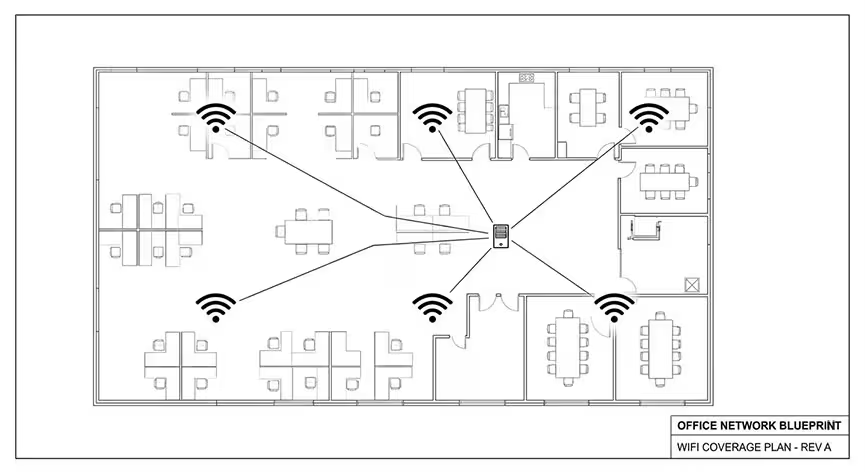
Inside the office, a poor Wi‑Fi experience can be just as damaging as a slow internet circuit. Older access points, weak signal in key areas, or unmanaged guest access can cause congestion, slowdowns, and security gaps. Updating network hardware, segmenting guest and IoT devices, and designing Wi‑Fi coverage around how your team actually works are all part of making sure your connectivity supports—rather than hinders—2026 tech trends.
A Simple Connectivity Upgrade Roadmap
If you suspect your internet is holding your business back, you do not have to rebuild everything at once. A practical roadmap usually starts with a basic assessment of your current connection, Wi‑Fi coverage, and critical applications, followed by targeted upgrades. From there, you can right-size your bandwidth, move from residential to business-grade service if needed, add redundancy for uptime, and refresh key network components where they create bottlenecks.
The goal is not just “more Mbps,” but the right mix of speed, reliability, security, and support to match your 2026 technology plans. That foundation allows you to get full value from cloud services, AI tools, hybrid work, and modern communications instead of fighting constant slowdowns and outages.
Conclusion
If you are ready to find out whether your current connectivity can truly support the way your business works today, ExcalTech can help. Our team can review your internet and network setup, identify gaps that affect cloud apps, AI tools, VoIP, and remote work, and recommend practical upgrades that fit your budget and growth plans. Reach out to schedule a connectivity and network health review so your next round of technology investments is built on a foundation your business can rely on.