
Introduction
Ransomware is not just an IT problem. It is a business continuity problem.
An attack can interrupt customer service, delay billing, lock staff out of critical systems, expose sensitive information, and force leaders to make difficult decisions under pressure. Recent research from Black Kite found that medium-sized companies accounted for roughly 73% of ransomware incidents from 2023 through the first half of 2026. - Opens in new window.
The most effective time to prepare is before someone clicks a malicious link, a device is compromised, or a ransom message appears on a screen. You do not need to predict every attack method. You do need clear answers to a few essential questions about recovery, access, detection, employee reporting, and incident leadership.
In This Article
- Introduction
- In This Article
- Can We Restore Critical Systems and Data?
- Who Can Access Our Most Important Systems?
- Would We Know Quickly If a Device or Account Was Compromised?
- Can Employees Recognize and Report a Suspicious Request?
- Who Makes Decisions in the First Hour?
- Ransomware Readiness Is an Ongoing Practice
- How ExcalTech Can Help
Can We Restore Critical Systems and Data?
Backups are important, but simply having backups is not the same as being able to recover from ransomware.
Attackers often try to locate, encrypt, delete, or disable backups so a business has fewer options during an incident. That is why resilient backups should be protected separately from everyday production systems, stored off-site or offline when appropriate, and tested regularly.
Start by identifying the systems and data your business would need first to resume operations. This may include:
- Customer and contact information.
- Accounting, billing, and payroll data.
- Shared files and document-management systems.
- Email and collaboration data.
- Line-of-business applications.
- Server configurations and network documentation.
Then ask: when was the last time we successfully restored this information?
A backup that has never been tested may be incomplete, inaccessible, or too slow to support the business when it matters most. A practical recovery plan should document which systems are restored first, who is responsible, and what level of downtime the business can realistically tolerate.
The familiar 3-2-1 approach remains a useful baseline: keep at least three copies of important data, store them on two different types of media, and keep one copy off-site. Your IT partner can help adapt that principle to your environment and validate that it supports your actual recovery priorities.
Who Can Access Our Most Important Systems?
Ransomware groups often begin with stolen or misused credentials. A compromised email account, remote-access account, or administrator login can give an attacker a foothold inside the environment.
That makes identity security one of the most important ransomware defenses. Every business should be able to answer:
- Which people have administrator access?
- Are there shared accounts that make activity difficult to trace?
- Are former employees, contractors, or vendors still able to sign in?
- Is multi-factor authentication enabled for email, remote access, cloud administration, and privileged accounts?
- Are access permissions limited to what each user genuinely needs?
Multi-factor authentication, or MFA, is especially important for remote access and privileged accounts because it adds a verification step beyond a password alone. Ransomware guidance consistently identifies MFA, stronger access controls, and limited administrative privileges as foundational safeguards.
This is also an area where routine reviews make a significant difference. Access changes constantly as employees join, change roles, work with outside partners, or leave the organization. Reviewing access once a year is better than never—but reviewing it regularly is far more effective.
Would We Know Quickly If a Device or Account Was Compromised?
No tool can guarantee that an attack will never get through. The goal is to identify suspicious activity early enough to contain it before it becomes a business-wide event.
Ask whether your organization can detect warning signs such as:
- Logins from unusual locations or at unexpected times.
- Repeated failed sign-in attempts.
- A sudden increase in account-privilege changes.
- Large or unusual outbound data transfers.
- Mass file changes, encryption activity, or files being renamed.
- Security software alerts on servers or workstations.
Endpoint detection and response tools, centralized monitoring, and carefully configured alerts can help turn these events into actionable signals rather than unnoticed background noise. Security teams should also have a clear process for deciding what happens next: who reviews the alert, who can isolate a device, and when leadership needs to be involved.
Speed matters. A suspicious account or device may turn out to be harmless, but a delayed response to a real compromise can give attackers time to move between systems, escalate privileges, and target backups.
Can Employees Recognize and Report a Suspicious Request?
Many ransomware incidents begin with a phishing message, a fake invoice, a malicious attachment, or a request designed to steal credentials. Today, attackers can also use AI to make messages more polished, personal, and convincing.
Employees should know what to do when something does not look right:
- Do not click unfamiliar links or open unexpected attachments.
- Do not reply to the suspicious sender.
- Verify a questionable request through a separate, known contact method.
- Report the message promptly through your organization’s designated process.
- Contact IT immediately if a link was clicked, a file was opened, or credentials were entered.
The FTC advises users to contact a company using a phone number or website they know is legitimate—not information provided in a suspicious message—and notes that links and attachments can install harmful malware. Prompt reporting also gives your IT team a chance to investigate, block malicious activity, and protect other employees before the same campaign spreads.
Training should not be a once-a-year box to check. Short, recurring reminders and realistic phishing simulations can help employees build confidence without creating a culture of blame. The goal is to make reporting a suspicious message feel like the normal and expected response.
Who Makes Decisions in the First Hour?
The first hour of a ransomware incident can be chaotic. Employees may not know whether to shut down a computer, disconnect from the network, call a manager, contact a vendor, or notify customers. Without a documented plan, valuable time can be lost.
Your organization should have a simple, accessible incident-response contact list that identifies:
- The internal person responsible for coordinating the response.
- Your IT or managed service provider’s emergency contact information.
- Leadership contacts and decision-makers.
- Legal, insurance, public relations, or compliance contacts as appropriate.
- The process for communicating with employees, customers, and vendors.
Early reporting is important. CISA recommends reporting incidents as soon as possible rather than waiting for a full investigation, and advises designating a point of contact on the IT or emergency-management team. If a phishing campaign is suspected or an attack is underway, the FBI’s Internet Crime Complaint Center, local FBI field office, and CISA may also be appropriate reporting channels.
The plan does not need to be a hundred-page document. A clear first-hour playbook can be more useful: isolate affected systems, preserve information, notify the right people, engage technical support, and avoid making irreversible decisions before the situation is understood.
Ransomware Readiness Is an Ongoing Practice
Ransomware resilience does not come from one product, one backup, or one annual assessment. It comes from combining dependable backups, stronger identity controls, monitoring, employee awareness, and a documented incident-response process.
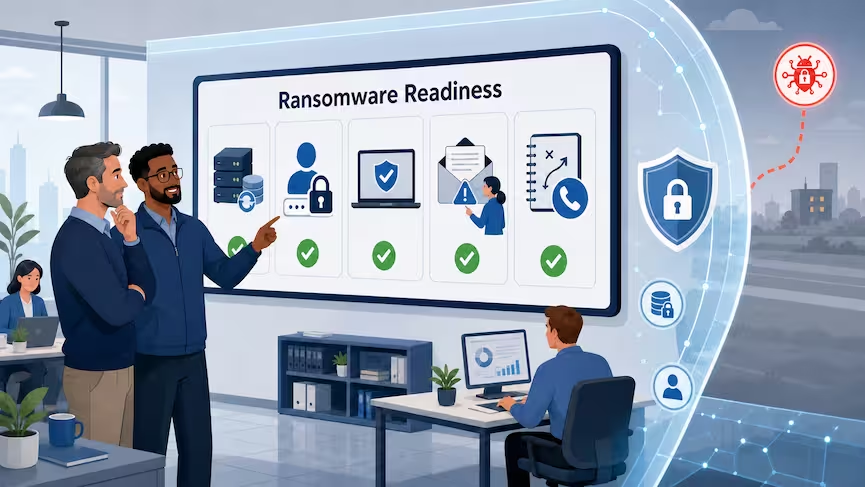
The five questions in this article provide a simple starting point:
- Can we restore critical systems and data?
- Who can access our most important systems?
- Would we know quickly if a device or account was compromised?
- Can employees recognize and report a suspicious request?
- Who makes decisions in the first hour?
If any answer is uncertain, that is not a failure—it is a useful signal that there is work to do before an incident tests the business.
How ExcalTech Can Help
ExcalTech helps businesses turn ransomware readiness into a practical, ongoing process. From backup and recovery planning to identity security, endpoint monitoring, employee awareness, and incident-response preparation, the goal is to help your organization reduce risk and recover with more confidence.
If you are not sure how your business would answer these five questions, contact ExcalTech for a conversation about strengthening your ransomware resilience before an attack forces the issue.