
Introduction
Most small businesses are past the “just experimenting” phase with AI. Surveys and usage data show that a majority of SMBs are now using generative AI in some form, and many report meaningful time savings and ROI in day‑to‑day work (ClearPath AI - Opens in new window). At the same time, uncontrolled “Shadow AI”—employees quietly using their own tools and plug‑ins—has made it clear that AI needs to be treated like any other critical technology: encouraged in the right places, and guided with simple, practical guardrails (See our previous post to learn more about Shadow AI).
This post focuses on that shift: how to move from scattered AI experiments to a small set of everyday workflows that are both productive and safe. It looks at AI primarily as a productivity helper inside routine business operations, while assuming you already have—or are building—basic AI governance, security, and browser controls.
In This Article
- Introduction
- In This Article
- Why 2026 is the year AI becomes "everyday work"
- Step 1: Decide what AI should and should not touch
- Step 2: Choose a small set of approved AI tools
- Step 3: Standardize a handful of everyday AI workflows
- Step 4: Build simple, practical guardrails
- Step 5: Train the team on “how we use AI here”
- A 90‑day playbook to go from experiments to everyday
- Conclusion
Why 2026 is the year AI becomes “everyday work”
Recent work and adoption studies show that a large share of knowledge workers now use generative AI in their weekly routines, with SMB employees often leading the way (Microsoft - Opens in new window). Many report getting back hours each month through help with drafting, summarizing, and basic analysis, even when their organizations have not fully standardized tools and policies.
At the same time, research on Shadow AI warns that when experimentation runs ahead of governance, businesses risk fragmented workflows, inconsistent results, and data leaving approved systems without leadership realizing it (Mimecast - Opens in new window). The opportunity in 2026 is to keep the creativity and speed of early experimentation while bringing a bit more structure: decide which AI use cases to embrace, which tools to support, and how to make them part of how the business actually runs.
Step 1: Decide what AI should and should not touch
Not every workflow is a good candidate for AI, especially in a small business where people wear many hats. Before picking tools, it helps to choose where AI is welcome and where humans should stay firmly in charge.
Good early candidates tend to be:
- Internal, low‑risk content: Drafting internal emails, meeting notes, summaries, and checklists where minor imperfections are acceptable.
- Structured, repetitive tasks: Sorting inquiries, organizing information, and filling in routine fields where AI is assisting a human rather than making final decisions.
- Idea generation and first drafts: Brainstorming marketing ideas, outlines, or proposal structures that humans will refine.
Areas to treat more cautiously include final legal documents, regulated communications, pricing decisions, and anything that relies on sensitive or highly identifiable customer data. In these cases, AI might assist with drafts or analysis, but people should be the final reviewers.
Step 2: Choose a small set of approved AI tools
Shadow AI grows when employees feel they have to find their own tools because nothing official exists. A simple way to move toward everyday, governed workflows is to approve a small set of AI options and make them easy to find.
For many small businesses, this might include:
- The AI features built into existing email, document, or collaboration platforms.
- A vetted AI assistant or chat tool for internal use, with clear rules about what data can be pasted or connected.
- A couple of specialized tools for specific teams (such as sales email assistance or basic marketing content support) that integrate with current systems.
The key is not to chase every new AI app, but to provide a shortlist of “good places to start” that align with the company’s governance and security posture, including any zero‑trust and browser controls that are already in place.
Step 3: Standardize a handful of everyday AI workflows
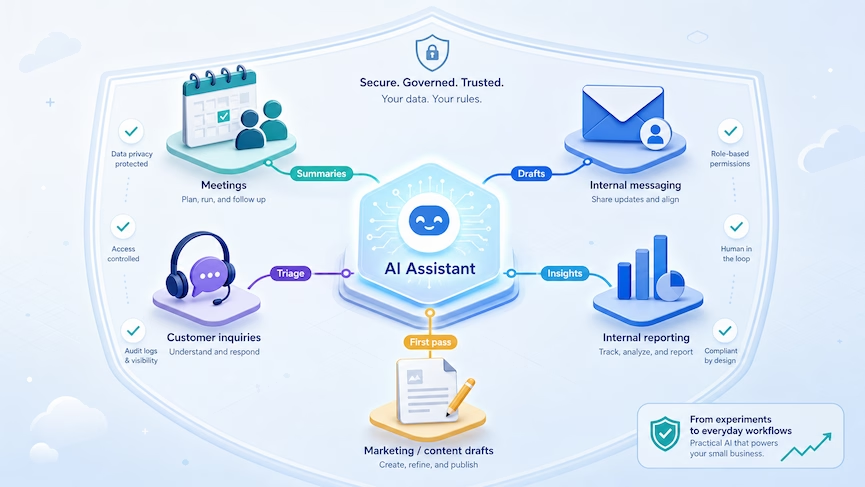
Once tools are selected, the next step is to define a few specific workflows where AI should be used, not just allowed. These examples focus on everyday productivity tasks, not security‑specific use cases.
Meeting summaries and action items
- What AI does: Turns recorded or transcribed meetings into concise summaries, decisions, and task lists, then saves them into collaboration tools or ticketing systems.
- Why this is safe and useful: It deals mainly with internal conversations and saves time without making external commitments on the organization’s behalf. People still decide what gets sent to clients or recorded in systems of record.
Internal email and message drafting
- What AI does: Helps staff turn bullet‑point notes into clear, professional emails or chat messages, especially for routine updates or follow‑ups.
- Guardrails: Every AI‑drafted message is reviewed and personalized before sending, and highly sensitive information is not fed into general‑purpose tools.
Customer inquiry triage (but not full automation)
- What AI does: Reads incoming web form submissions or emails, categorizes them (billing, support, sales, etc.), suggests priority, and drafts first‑pass replies for human review.
- Guardrails: AI does not send responses on its own; staff remain accountable for the final wording and any decisions or promises.
Content outlining and first drafts
- What AI does: Helps marketing or sales teams create outlines, headlines, and first drafts for blog posts, landing pages, or simple collateral, which are then edited and fact‑checked internally.
- Guardrails: Outputs are reviewed for accuracy, tone, and brand alignment, and sensitive client material is not pasted directly into prompts.
Internal reporting and basic analysis
- What AI does: Assists in turning exported data (like CRM or ticket reports) into plain‑English summaries and simple charts that managers can review.
- Guardrails: Authoritative data remains in existing systems; AI helps explain and visualize it, but does not become the primary storage location.
Step 4: Build simple, practical guardrails
To avoid repeating past mistakes with Shadow AI, each everyday workflow should sit inside clear but lightweight rules.
Practical guardrails include:
- Data rules in plain English: Spell out what can and cannot go into AI tools (for example: no full customer records, no payment card details, no passwords).
- Source of truth: Make it clear that AI outputs must always be checked against systems of record and policies before being treated as final.
- Tool boundaries: Tie usage to the organization’s identity, browser, and device standards—such as using specific browser profiles for work AI, and only allowing approved tools to connect to email, storage, or CRM.
These measures keep AI workflows aligned with existing security and governance practices instead of becoming a separate, unmanaged layer.
Step 5: Train the team on “how we use AI here”
Training does not have to be long or technical. What employees need most is clarity about expectations and simple examples that match their daily tasks.
Helpful approaches include:
- Short live demos: Use brief sessions to demonstrate how to use AI for a few core workflows (like meeting notes and internal email drafting) and what “good use” looks like.
- Good vs. risky prompt examples: Provide side‑by‑side examples of safe prompts and unsafe ones (for instance, “Summarize this internal meeting transcript” vs. “Here’s a client’s full financial history…”).
- Reinforce human responsibility: Emphasize that AI is a helper, not a decision‑maker; employees are still accountable for the quality and appropriateness of the work they deliver.
Training should connect to existing policies and security awareness efforts so people see one coherent approach rather than a collection of disconnected rules.
A 90‑day playbook to go from experiments to everyday
To move from scattered usage to standard workflows, it can help to work in short cycles.
- Month 1 – Discover and choose: Inventory where employees are already using AI, identify three to five promising workflows, and select a small set of tools to formally support.
- Month 2 – Pilot and document: Run pilots in one or two teams for each workflow, document simple step‑by‑step guides, and refine data and usage guardrails based on what works and what doesn’t.
- Month 3 – Roll out and train: Expand successful workflows more broadly, offer short training sessions, and schedule regular reviews to update tools and rules as AI capabilities evolve.
Conclusion
With this approach, AI shifts from being a collection of side experiments into a set of dependable, everyday helpers embedded in how the business communicates, meets, analyzes information, and serves customers. For organizations that want support deciding which workflows to standardize and how to deploy AI tools that fit their security and governance approach, ExcalTech can help map out a practical AI workflow plan tailored to their team.